
Products

Six products on one kernel. Your brand on the surface.

Four are live — Lens, Journey, Glyph and Pulse. Two are in development — Lobby and Throne. Each is a finished operator application your team runs under your own name. All of them share one inventory, so the account Lens flags is the account Journey offboards and Pulse watches.

With every product

What Aurelion supplies. What you put your name on.

You are not buying a framework to finish. Every product below ships ready to run, and Aurelion keeps it running.
  • A finished operator application

    Not a toolkit. Screens your team and your client's team open on Monday morning.
  • Connectors to the client's systems

    Directories, HR exports, cloud and SaaS accounts, sign-in logs. Added and maintained by Aurelion.
  • Updates and security patches

    Signed releases, long-term supported branches, a published CVE process. You answer the questionnaire with facts.
  • Your brand, your price

    The product carries your name. You set the price, invoice the client and own the renewal.
Access audit · Posture

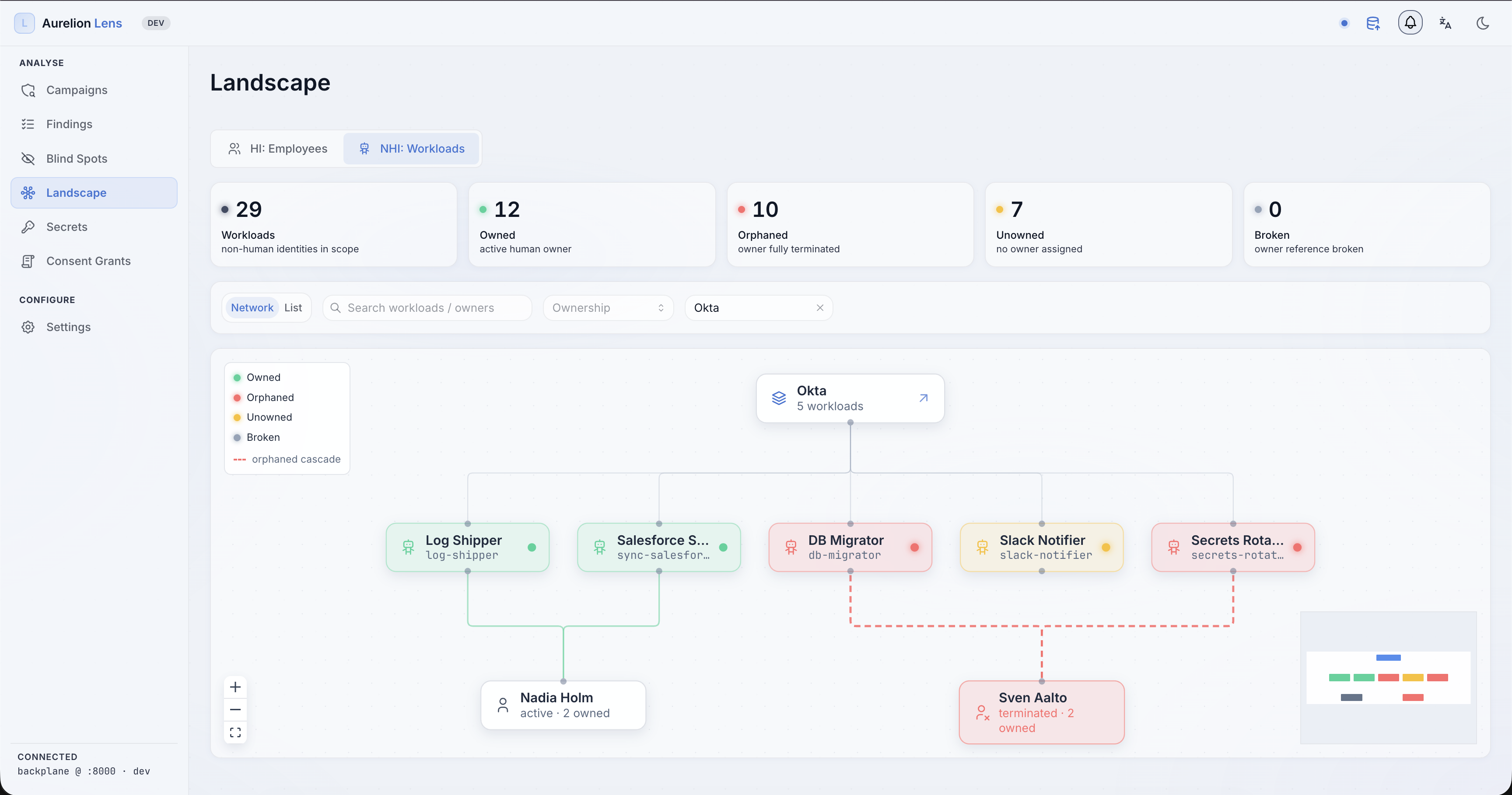
Aurelion Lens

Who has access to what — in a report an auditor accepts. Lens reads the client's directories, HR exports, cloud and SaaS accounts and answers the question every audit starts with. It never writes back, so it cannot break anything — which is why most partners start here.

  • Reads from the client's systems
    CSV exports, directories, cloud and SaaS accounts, mapped into one inventory. Read-only by design.
  • Checks that run again and again
    Accounts of people who left, rights nobody uses, privileged access with no owner, contractors past their end date.
  • Findings with a fix
    Every finding carries a severity, an owner and what to do about it — the shape an auditor and a help desk both understand.
Who it counts
  • Employees
  • Contractors
  • Service accounts
  • AI agents
lens.yourbrand.local
Aurelion Lens interface screenshot
Lifecycle · Joiner, mover, leaver

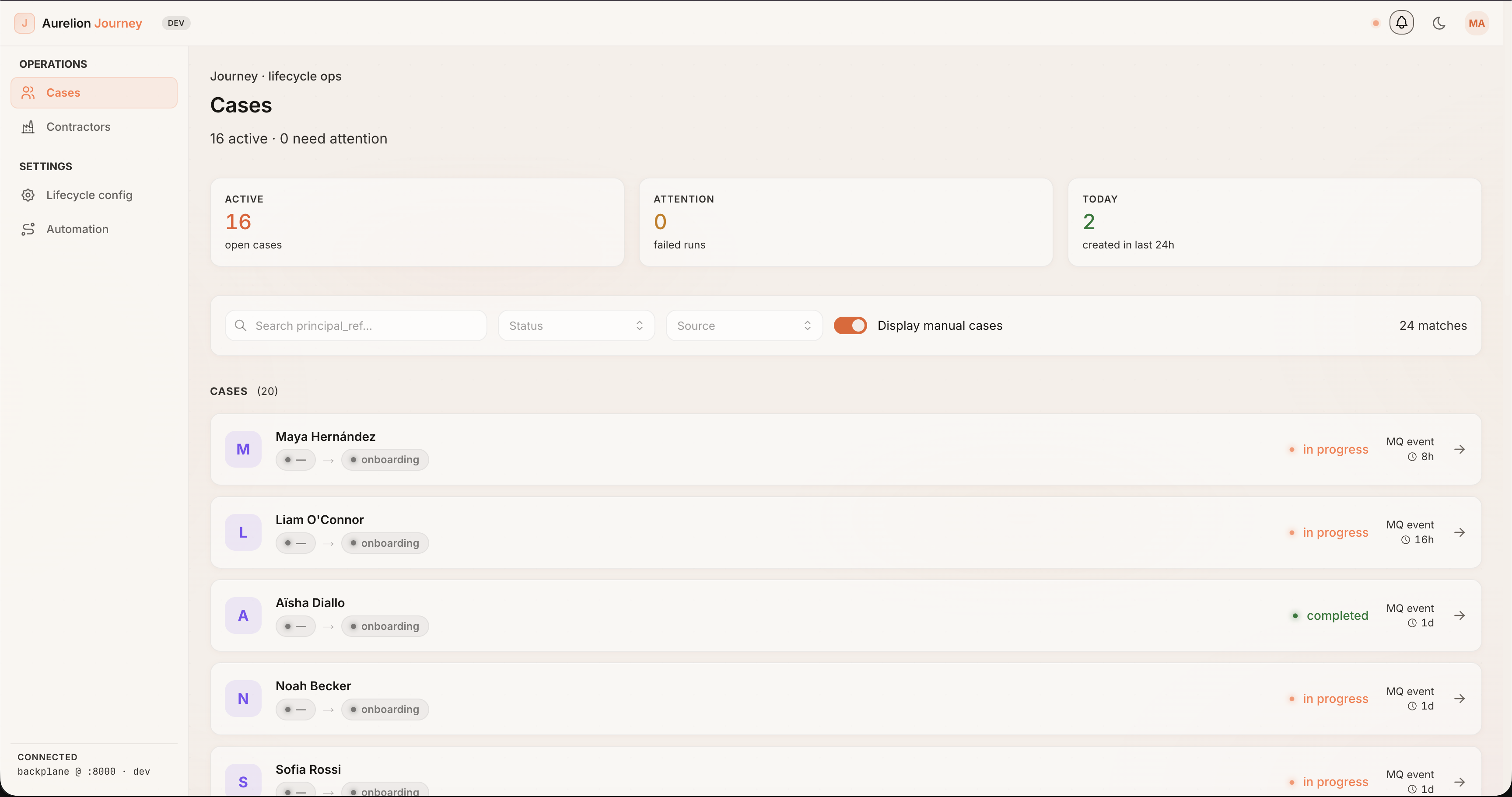
Aurelion Journey

Access granted and removed when people arrive, move and leave. Journey turns the HR event into the access change. A new hire gets what the role needs on day one; a leaver loses everything on the last day; a transfer loses the old and gains the new. The operator sees it as a case queue, not a script.

  • A live case queue
    Active, needs-attention and due-today buckets across people and service accounts.
  • Typed transitions with an audit trail
    Onboarding, leaving, on leave, back — each step recorded with who approved it and when.
  • Owners leave too
    When the owner of a service account or an AI agent leaves, the account is reviewed — not forgotten.
Who it counts
  • Employees
  • Contractors
  • Service accounts
  • AI agents
journey.yourbrand.local
Aurelion Journey interface screenshot
Sign-in · Policy

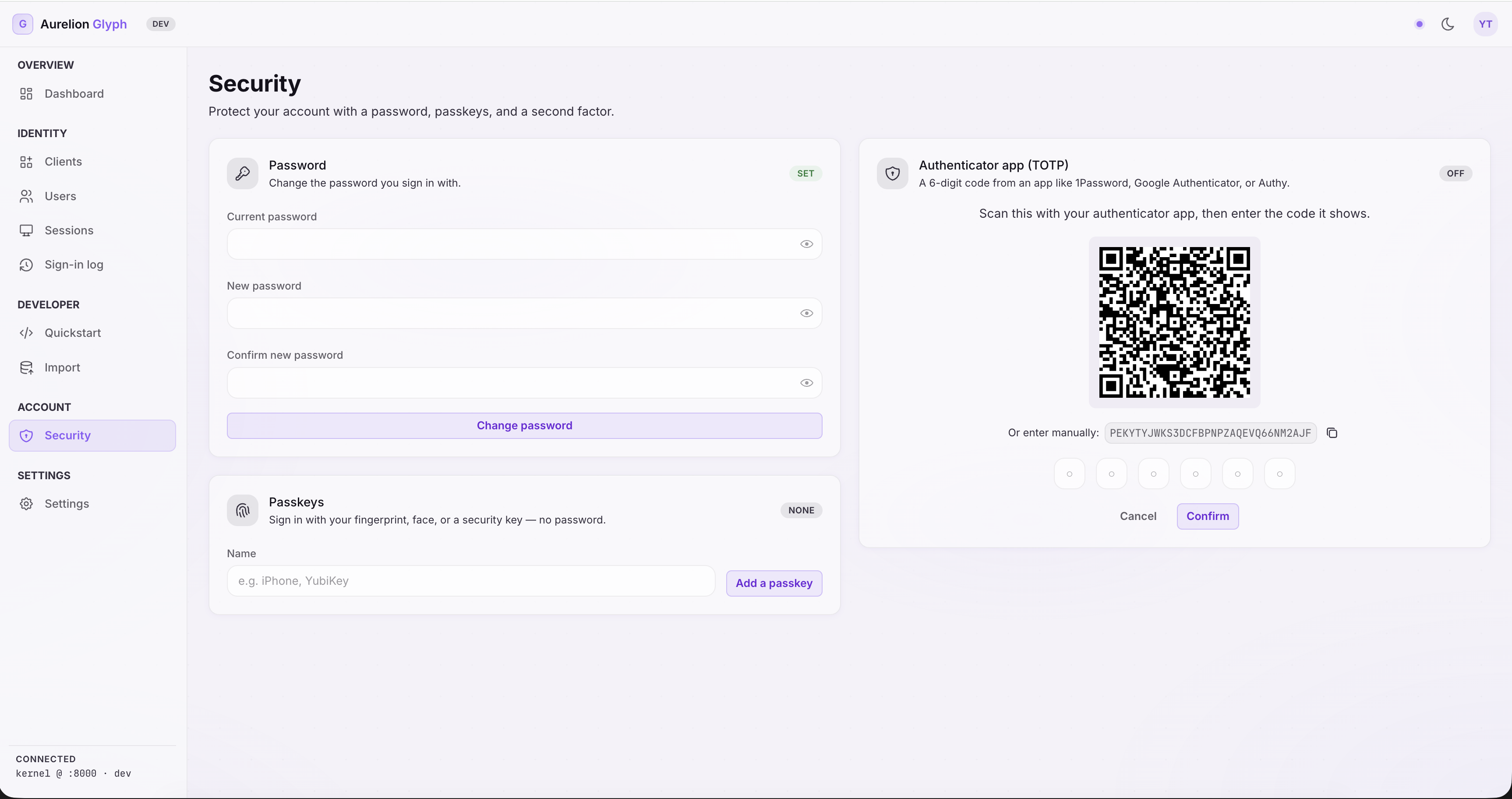
Aurelion Glyph

Who may sign in, and what they may do once they have. Glyph is the sign-in service for the workforce and the policy engine behind every product. It answers one question for people, services and agents alike: may this subject do this action on this resource, right now?

  • Sign-in
    Passwords, passkeys, multi-factor; sessions and recovery.
  • Single sign-on and federation
    One identity across the client's applications and the ones they rent.
  • One policy decision point
    Standard AuthZen interface. For AI agents the answer can be “ask a human first”, and the decision is logged with the full chain of who asked on whose behalf.
Who it counts
  • Employees
  • Service accounts
  • AI agents
glyph.yourbrand.local
Aurelion Glyph interface screenshot
Detection & response

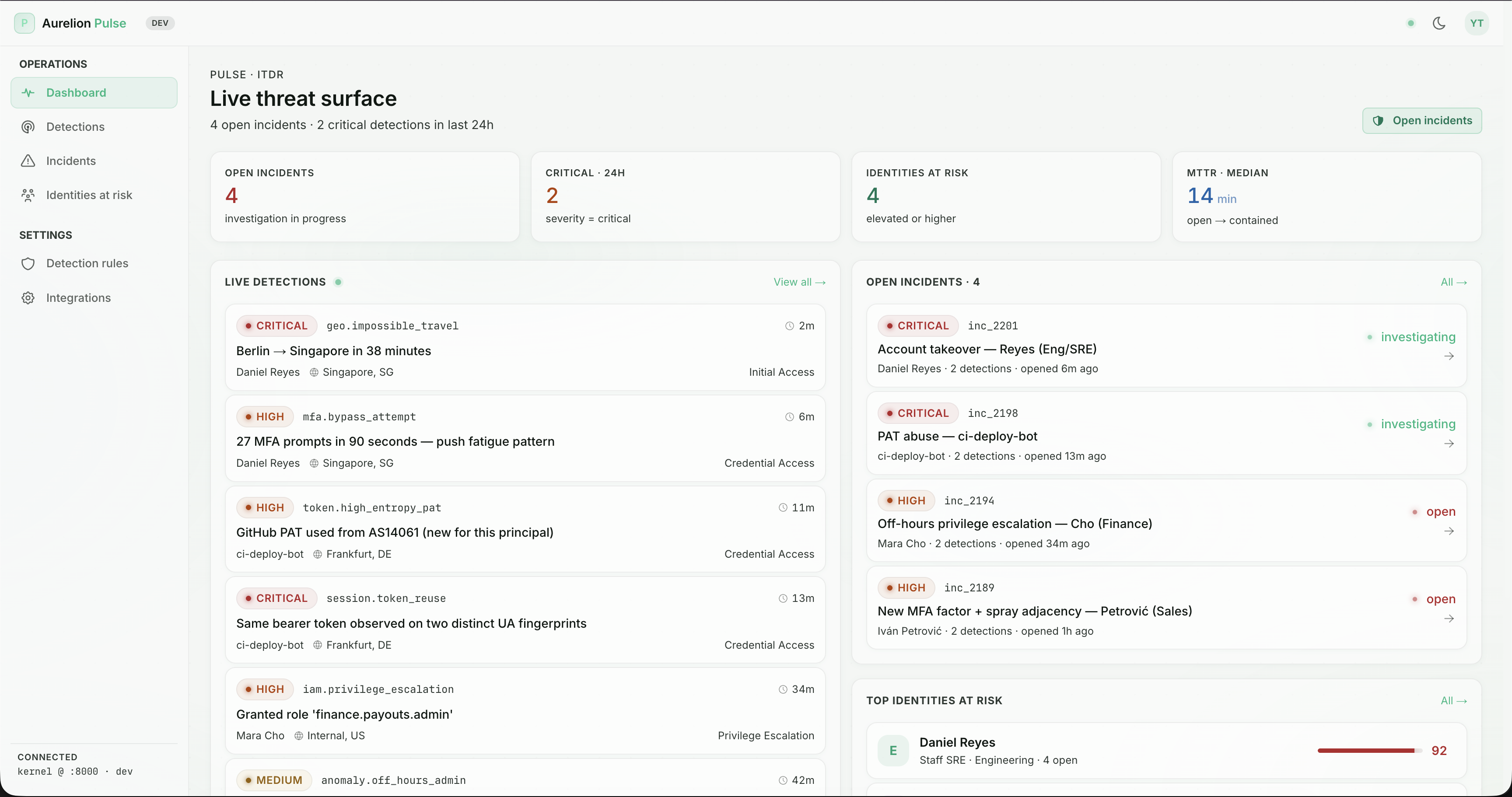
Aurelion Pulse

When an account starts behaving wrongly, see it and stop it. Pulse watches the accounts the other products know about. Sign-ins from two countries in an hour, privileges that grow overnight, a service account that suddenly reads everything — detected, correlated with the inventory, and contained.

  • Live detections
    Signals from sign-in, directory and cloud logs, scored against the inventory.
  • Open incidents
    Triage, contain, close — with the affected accounts and their owners attached.
  • Agents baselined by task
    An agent does something different every run. Pulse learns the sequence of calls inside a task, not a schedule — so different is not the same as suspicious.
Who it counts
  • Employees
  • Service accounts
  • AI agents
pulse.yourbrand.local
Aurelion Pulse interface screenshot
AI agents

AI agents, counted by every product.

Platforms secure their own agents. Aurelion is the layer above all of them: every agent, whichever platform runs it, in one inventory with the people and service accounts it shares credentials with.
  • Found where they live

    OAuth grants, MCP servers, agent platforms, automation tools, API keys in vaults and CI.
  • Resolved through their tools

    What an agent can do is agent → tools → application functions, and the set changes at runtime. Lens resolves it.
  • Agent calling agent

    The full call chain lands in the audit trail, not just the last hop.
  • Baselined by task, not by schedule

    Pulse learns the sequence of calls inside a task, so "different every time" is not "anomalous every time".

Guardrails protect the agent's head. Aurelion governs what its hands can reach.

In development

Two more on the same kernel.

Lobby and Throne are being built now. They reuse the same sign-in engine, inventory and policy decision point — so when they ship, they already know every account the other four do.
In development
Customer sign-in

Aurelion Lobby

The front door for the client's own customers.

Sign-up, sign-in, social and passwordless flows, consent and self-service for customer accounts — on the same sign-in engine and inventory as the rest of the line.

Who it will count
  • Customers
  • Customer-facing agents
In development
Privileged access

Aurelion Throne

Admin rights for the time they are needed, with a record.

Vaulted credentials, time-boxed elevation, session recording and break-glass for human admins and privileged service accounts.

Who it will count
  • Admins
  • Privileged service accounts
  • Privileged agents
Where to start

Start with Lens. It reads; it cannot break anything.

Read-only means no change to the client's systems — and no 24/7 operations centre to start. First findings on real data in two to three weeks. Or start with the AI-agent inventory: the same read-only audit, scoped to agents, for clients whose first question is "what is running in our name?"
See it on real data

Two to three weeks from first dataset to first findings report.

Bring one client where the relationship already exists. We will stand up the environment with you.